
用户272688·Oct 14
Why Is My Kubernetes Job Still Pending? Tracing Kueue Admission with Headlamp
By Utkarsh Raj (LFX Mentee, CNCF), René Dudfield (Microsoft), Kevin Hannon (Red Hat) | Wednesday, October 14, 2026
You submit a Kubernetes Job and wait for its Pods to appear. A minute passes. Then another. The Job is still suspended, there are no application logs, and there may not even be a Pod to inspect.
In a cluster managed by Kueue, this can be completely normal. Kueue may still be deciding whether the Job can use the requested resources. The useful question is not only “Why is the Pod pending?” It is first “Has Kueue admitted the Workload?”
The Kueue plugin for Headlamp brings that investigation into the Headlamp UI. Instead of reconstructing the admission path from several commands and large YAML objects, you can begin with the Workload, read its condition message, and follow links through the LocalQueue, ClusterQueue, ResourceFlavor, and Cohort.
This article follows that Headlamp-first path. The command line appears only in a short optional section for reproducing the example.
Before you begin
You need a Kubernetes cluster with Kueue installed,
a Headlamp installation, and the
0.1.0-alpha Kueue plugin.
Your Kubernetes identity must be allowed to read the Kueue resources used in this article.
The alpha release provides read-only views for Kueue v1beta2 Cohorts, ClusterQueues, LocalQueues,
ResourceFlavors, and Workloads. It does not add its own create, edit, stop, resume, or delete
workflows. Headlamp still provides its standard YAML and resource actions where your permissions
allow them.
First, separate admission from Pod scheduling
Kueue and the Kubernetes scheduler answer different questions.
Kueue admission: Should this Workload start now, considering queue policy, quota, ResourceFlavors, admission checks, and other waiting Workloads?
Pod scheduling: After the Workload is admitted and the Job resumes, which nodes can run its Pods?
That boundary changes the investigation. If the Workload is not admitted, stay in the Kueue section
of Headlamp. If it is admitted but its Pods are still Pending, move to Headlamp's normal Job and
Pod views and inspect scheduler events.
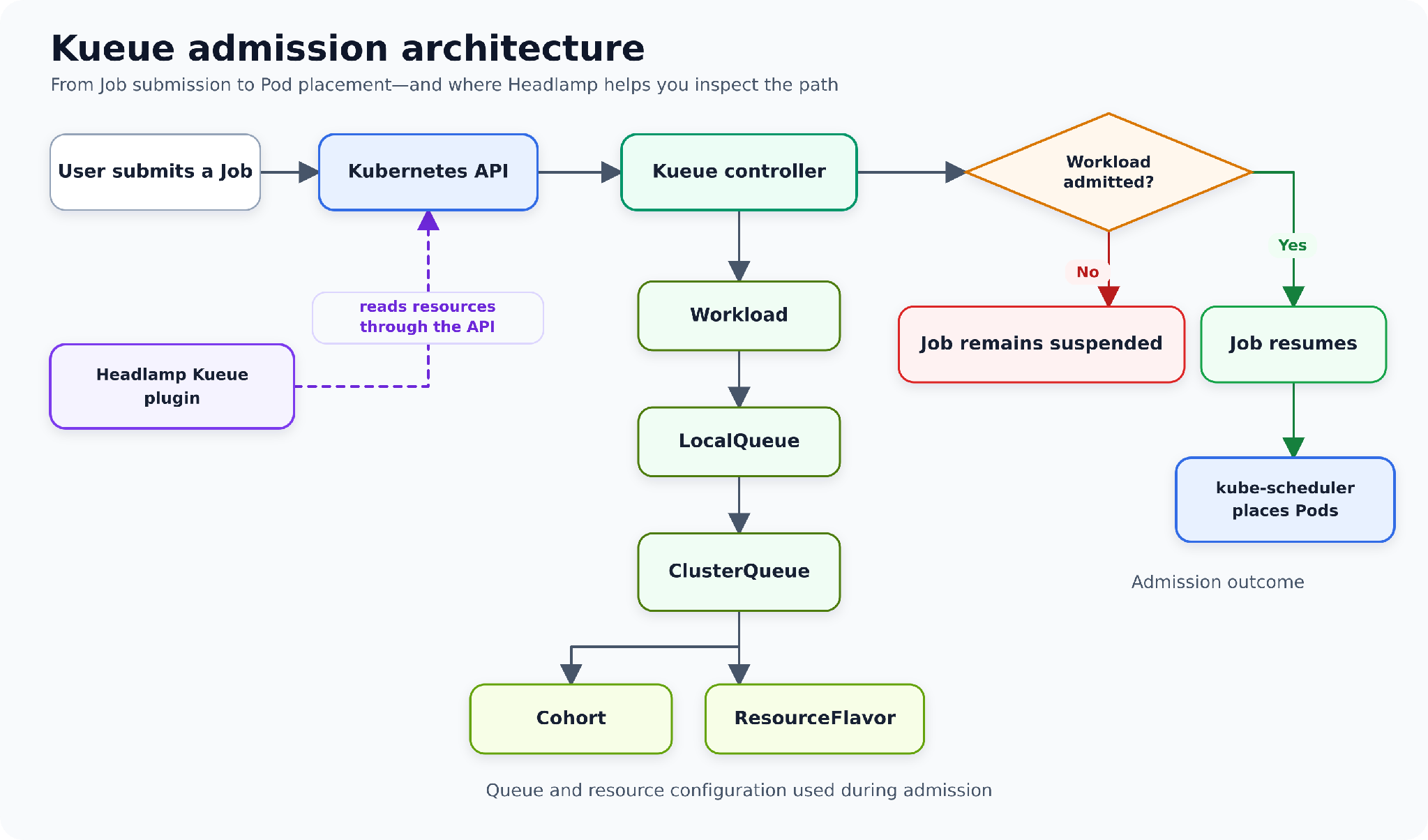
Kueue admission architecture
The Headlamp-first troubleshooting path
The quickest investigation starts with the Workload, not with a shell.
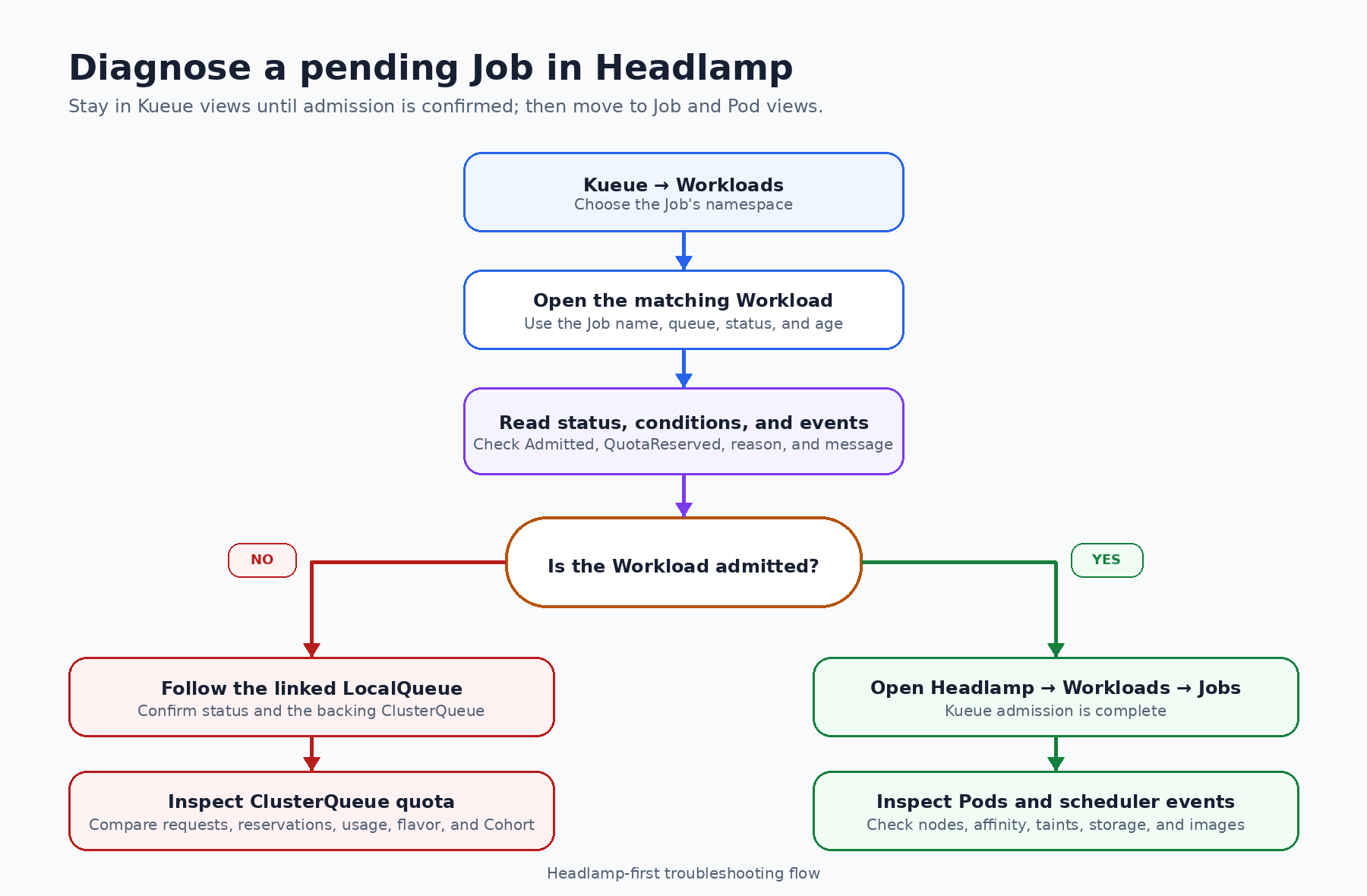
Tracing a pending Job through Headlamp
Step 1: Open the Workloads view
In Headlamp, open Kueue → Workloads. Select the namespace that contains the Job, then find the Workload created for it.
Kueue creates a Workload to represent the
resource request and admission state of a Job. In the alpha plugin, owner references are shown as
Kind/name text but are not yet clickable. The Workload name normally contains the Job name, so the
namespace filter and table search are the simplest ways to locate it.
Before opening the detail page, the list already gives you a useful first scan:
LocalQueue
priority and priority class
active state
admitted state
completion state
a readable current status such as
Admitted,Finished, orInadmissibleage
If there is no matching Workload, check three things before going further: the selected namespace, whether the Job was submitted to a LocalQueue, and whether your Kubernetes account can list Workloads. The plugin performs permission checks and displays an access message when the current identity cannot read a resource.
Step 2: Read status, conditions, and events
Open the Workload. Start with its current status and conditions, not with the full YAML.
For admission troubleshooting, the most important condition types are QuotaReserved and
Admitted.
Admitted=Truemeans Kueue has admitted the Workload. The Job can resume, so any remainingPendingPods belong to the scheduling branch of the investigation.QuotaReserved=Falsewith a reason such asPendingmeans Kueue has not reserved quota. The condition message explains what prevented the reservation.An
Inadmissiblestatus means the Workload currently cannot fit the available queue configuration. A missing covered resource, unsuitable ResourceFlavor, stopped queue, or admission check can all lead you here.
For example, a condition message may report that Kueue could not assign a ResourceFlavor because the ClusterQueue has insufficient CPU quota. That message is the first real answer to “Why is my Job still pending?” The rest of the Headlamp journey explains the configuration behind it.
Also check the Events section. Conditions describe the current state; events help show what recently changed or what Kueue attempted.
Step 3: Compare the Workload's request with its assignment
Stay on the Workload detail page and inspect the PodSets and resource requests. The plugin shows the requested Pod count, CPU, memory, and other resources that Kueue evaluates together.
This matters because a Job with parallelism: 3 and a one-CPU request per Pod asks Kueue for three
CPUs in total. Looking at only one Pod's template would underestimate the Workload.
If quota has already been reserved, the same page also shows the assigned ClusterQueue, ResourceFlavors, and admitted resource usage. If those admission assignments are absent, the Workload has not reached that point yet.
In our example, the Workload requests:
three Pods
three CPUs in total
600 MiB of memory in total
The next question is where that request entered Kueue.
Step 4: Follow the linked LocalQueue
Use the LocalQueue link on the Workload detail page. A LocalQueue is the namespace-level entry point used by the Job. It connects namespaced Workloads to a cluster-scoped ClusterQueue.
The LocalQueue page shows:
its namespace and connected ClusterQueue
stop policy and current status
pending, reserving, and admitted Workload counts
Kueue conditions and Kubernetes events
related Workloads in the same namespace
This page answers two practical questions: Did the Job enter the queue you expected, and is it the only Workload waiting there?
If the LocalQueue is inactive or stopped, that may already explain the wait. If it is active, follow the linked ClusterQueue to inspect the capacity behind it.
(节选)
原文:Kubernetes Blog|Why Is My Kubernetes Job Still Pending? Tracing Kueue Admission with Headlamp,2026-10-15

成为第一条评论!
Nobody's responded to this post yet. Add your thoughts and get the conversation going.